From User Flows to AI Flows: How Product Design Changes When Software Predicts Intent

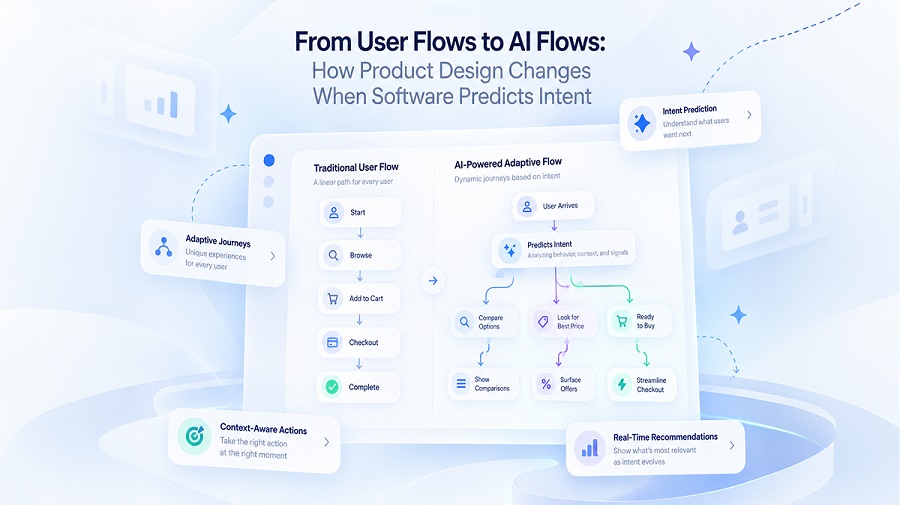
Traditional product design follows a clear path to create a UX, which is a problem-solving approach. The main goal is to make a product easy to use.
In this reactive model, the interface simply waits for the next click. However, is this model relevant to the modern fast-paced era? Users are looking for more than easy navigation.
Modern AI-native software can analyse context, learn from past interactions, and predict what a user might need next.
Let’s understand how AI-powered UX design works for modern digital products.
What Are User Flows, and Why Are They Changing?
—————————-
A user flow is the steps a user undertakes to complete a task. For example, an online shopping flow might include:
- Opening a product category
- Applying filters to narrow the results
- Selecting a product
- Adding it to the cart
- Completing the checkout process
There are different interaction patterns and tasks in each step that designers predict and build into the interface. The process is useful for tasks that have only one goal, such as form submission or payment, or other features with clearly defined outcomes.
However, they have limitations. For many digital products, users do not have only one goal, or they might change their minds. So, a better interface with the capability of context analysis is required.
How Does AI-powered UX Design Change the Interaction Model?
—————————-
AI introduces a layer of prediction into the experience. The dynamic has shifted from static layouts and screens to probabilistic outcomes. How is this happening? Through the collaborative work of multiple AI agents.
So, what is the work process here?
- First, the AI listens to a user’s request or goal and breaks it down into smaller parts.
- Different agents start to get into action. They retrieve data and calculate based on compliance and conversation history.
- The system efficiently understands relevant context. Result? The user does not need to repeat anything.
- Next comes the response or action to the user for review. Once approval comes from the user, the system proceeds with the final output.
- The product completes the task or asks for clarification.
Consider a customer using an AI-powered expense management platform. They might ask, “Show me the travel expenses that increased this quarter and identify the main reasons.”
A conventional interface would require the user to select a reporting period, choose an expense category, etc.
But AI personalization can reduce all these efforts and complete the task by retrieving the data and calculating the results.
RAG into the Action
—————————-
To bring such efficiency to the enterprise level, there is a system called RAG. It stands for Retrieval-Augmented Generation, which is specifically beneficial for enterprise AI. In an enterprise, there is a huge amount of data that includes customer records, employee details, policies, invoices, etc.
RAG helps retrieve the right data to answer any specific query, which can not be done by general AI models, as they can not access company data. It works by analyzing evidence; thus, the response is easier to verify.
Designing for Multiple Outcomes
—————————-
An AI-driven product design works to provide more than the expected results. It defines ambiguous intent or incomplete tasks clearly, so if there is any issue in solving a request, it goes in the right direction.
So, it does not follow a linear path; rather, it follows fluid, unpredictable user paths.
Important scenarios include:
- The system asks for a required detail before proceeding.
- The interface presents possible lightweight prompts to clarify the context.
- The system explains the limitation and offers an alternative.
- The user can correct the result without restarting the entire task.
- The interface explains whether the action failed, was partially completed, or needs to be retried.
The product team is responsible for mapping these during the design phase to give seamless AI-powered digital experiences to users.
How Product Design Changes When Software Predicts Intent?
—————————-
AI UX design includes “intent clarity”; that means AI understands what users are trying to achieve. Some key guidelines for this kind of design include:
Intent Capture Should Be Natural
A multimodal interface is the right way to capture intent more naturally. A multimodal interface stands for a combination of text, speech, visual, and gesture inputs. So, when a user interacts with a product comfortably, the results also become more specific.
Giving Users the Freedom to “Steer” the AI
This is another principle of an efficient AI-powered UX design. Your users should be able to steer AI in different directions without restarting any task. Moreover, they should also be able to adjust any parameter independently.
Superior Context Awareness
AI-native product design should establish artificial intelligence as the core of understanding user behavior. This way, it can analyze repetitive inputs, users’ preferences, habits, location, etc., and optimize workflows to streamline them.
Visible Breakpoints for Users to Have Control
Intent-based UX design should have guardrails like “review and approve” before executing any high-stakes action like completing a payment action. This ensures transparency and trustworthiness of the digital product.
Graceful Degradation Handling
If the system fails to analyze an intent and confidently give an answer, it should seamlessly degrade into a structured, conventional interface. An example of this can be a drop-down menu, from which the user can choose an option to get more accurate results.
Measuring the Success of AI-powered UX Design
—————————-
When measuring metrics of an AI-powered product, there should be a broader evaluation along with the traditional metrics. But why? Because a flow still looks efficient if it produces an incorrect output. This will pile up more issues to resolve later.
Product teams should combine usability measures with indicators of system quality.
Metrics That Matter
Task completion rate, which indicates how conveniently users can achieve their goals.
Time to completion, which shows whether AI reduces the effort required to finish a task.
Correction rate is also an important metric that shows how often users need to revise the system’s output.
Acceptance rate is another crucial criterion; however, the final decision needs context because acceptance alone does not prove quality.
Fallback rate indicates how frequently the system needs clarification and human assistance.
Lastly, a product team should check how efficiently the system handles error impact and how easily the user recovers.
The Importance of Keeping Human-in-the-Loop
—————————-
As AI agents are taking over the responsibility of task completion, there are still some cons. If it misreads an input, the answer might also be wrong. Therefore, mistake tracing and resolution should also be mapped. In this process, humans should be in the loop.
An efficient and trained product team can handle sensitive information, complex financial data, and help AI to reduce complexity and get the job done. The target is not to increase human intervention, but to make it more strategic.
The Key Takeaway on The Future of AI-Powered UX Design
—————————-
- Interfaces will adapt to users’ needs in real time
- AI agents will coordinate complex tasks across multiple applications
- Voice and multimodal interactions will become more intuitive
- Predictive interfaces will reduce repetitive manual actions
- Privacy controls will become central to personalised experiences.
To Wrap Up
The transition from traditional UX design to AI-driven product design changes how a product team should approach the task.
The products that earn trust won’t be the ones that predict the most. They’ll be the ones that handle wrong predictions well. They ensure clear checkpoints, easy corrections, and a fallback that keeps users moving.
New-age product teams should be strategic in their approach. What can be the first step? Picking one high-friction flow in the product and trying to solve that. Continuous testing is important to understand the AI layer and how it can remove obstacles in user interaction.