Designing Interfaces for AI Agents: What Changes When Software Can Act for Users

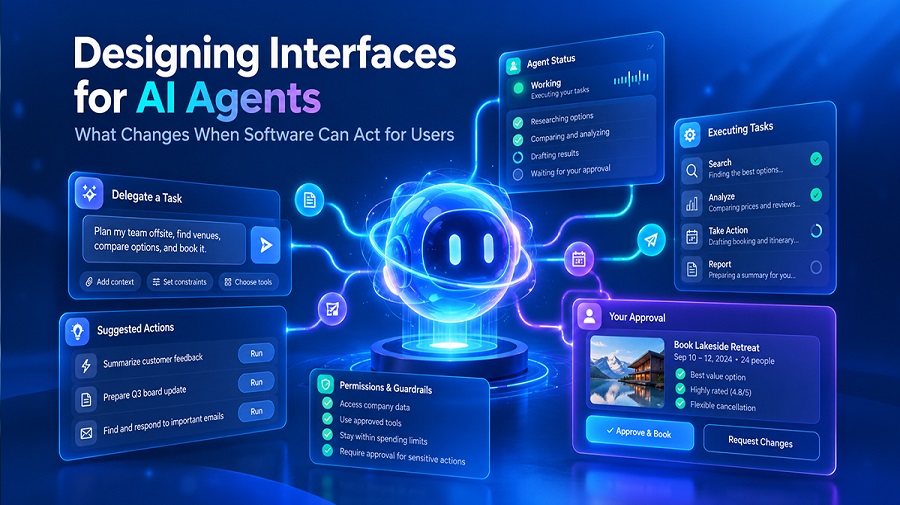
How much freedom should an AI agent have?
If the agent has too little freedom, it keeps asking for permission. If it has too much, it may finish the job before anyone can step in.
Most teams learn this the hard way. An AI agent that keeps asking “Want me to continue?” at every step gets tiring, and people soon click approve without reading. But an agent with no checks can send the wrong email or delete a file before anyone notices.
Neither earns trust. Users need an interface that shows what the agent can do, when it will ask for approval, and how to step in at any point. That is the first step in designing interfaces for AI agents that people can trust.
This changes how designers build software. A request and a final result are no longer enough. Interfaces need to show what the agent is doing, so users can follow along and step in when it matters.
So what actually changes when software starts acting on its own? Here is a closer look.
How UI/UX Design Changes When AI Can Act Autonomously for Users
—————————–
The most significant change occurs as design stops helping users do tasks and begins to delegate work to an agent. When an agent acts, the interface must make its work visible and know when to ask for approval. That is the core of agentic AI UX design. Here are the changes that become visible easily.
Shifting From Task Execution to Task Delegation
In traditional software, your job was to help users execute tasks, one click at a time. With autonomous AI agents, users give a task to an AI agent, which then identifies steps to resolve the task. That changes what you design.
Instead of mapping flows, you shape how users state their intent and where they set limits. The shift to agentic AI is coming quickly. In Deloitte’s 2026 survey of 501 US leaders, 74% expect almost half of their business processes to be rebuilt around AI agents within four years. 61% believe most of those AI agents will operate independently, with humans stepping in only to oversee the process.
Moving From Fixed Screens to Adaptive Experiences
Delegating a goal also changes what appears on screen. Fixed screens follow a script. Large language models (LLMs) don’t, because they can answer the same request differently each time. Your AI-powered user interfaces therefore have to adapt around open-ended output. A rigid form can’t hold that, so conversation and context become your new building blocks.
Replacing Hidden Logic With Visible Reasoning
Flexible output creates a new problem. Users can’t tell how the agent reached its answer, which brings back the missing middle from the intro. Good AI interface design closes that gap by showing what the agent plans to do and why. The evidence supports it. In a 2026 SAP study of business users, moving from a bare loading indicator to detailed status, next steps, and data sources raised the chance of users preferring a screen by 37.79 percentage points.
Measuring Trust Instead of Clicks
Once users can see the reasoning, you need a way to tell whether it works. Click counts say little when the agent does the clicking. Teams that practice AI-first interface design should track how often users override the agent and how quickly they recover from mistakes. These metrics can indicate the user’s reliance on the agent’s decisions and actions. Many organizations still lack it. Deloitte’s 2026 survey found that 70% of leaders don’t feel they can trust and govern agents.
Seeing these shifts is the easy part. Next, let’s look at how you build that trust into the interface itself.
How to Design Interfaces for AI Agents That Users Trust
—————————–
Trust comes from showing users what the agent is doing and being honest about what it doesn’t know. That is the practical core of designing interfaces for AI agents.
Users lose confidence when the middle of the process stays hidden, so the fix starts right there.
Showing the Plan Before the Agent Acts
Begin before the agent does anything. When a user gives the agent a goal, show the steps the agent plans to follow. The user needs a visible plan as a reference point so that they have an option to intervene and change course. This is especially important with autonomous AI agents because they can run alone for minutes without stopping. The plan must stay short enough to understand at a glance.
Making Agent Actions Visible in Real Time
Once the agent gets going, users still want to follow along. Show what’s finished and what’s coming next. Good AI interface design makes this feel like a live status, not a spinner that says nothing. Users can tell the agent is on track, and they’ll notice quickly if it isn’t.
Signaling Confidence and Uncertainty Honestly
Seeing the steps helps, but users also need to know how far to trust each result. Large language models (LLMs) can give a wrong answer in the same confident voice as a right one. So your interface should flag the shaky answers. Research backs this up. In the 2026 SAP study, adding a warning to low-confidence recommendations raised the chance of users preferring a screen by 22.46 percentage points. A clear warning tells users when to double-check, and that gives users a reason to prefer the screen
Adjusting Detail to the User and the Task
There’s a catch with all this visibility. Show too much and people get overwhelmed. Strong AI UX matches the amount of detail to the moment. The SAP researchers discovered that detailed explanations are most important for high-stakes tasks and newer users. However, experienced users prefer speed once they trust the system. So layer it. Start with an overview and let people click to see the full reasoning if they want.
User Control in AI Agent Interfaces
—————————–
Users need a way to approve big moves, jump in mid-task, and undo mistakes. Without that, even an agent that shows its work still feels risky.
Control lets users act on what they see, and it matters more as agentic AI takes on bigger jobs. These controls cover most of what people need.
- Approval gates. Ask for a yes before anything costly or hard to undo, like a payment or a deletion. Skip it for small steps, or people will click “approve” without reading.
- Pause and stop. Put a clear stop button within easy reach, so users never feel stuck watching.
- Edit and redirect. Let users fix one step or change the plan without starting over.
- Adjustable autonomy. Let users decide how much freedom the agent gets, and change it as trust grows.
Good AI-powered user interfaces build these in from day one. Users shouldn’t have to hunt for a way to stay in charge.
Error Recovery and Feedback in AI-Powered Interfaces
—————————–
Large language models (LLMs) can misread a request, and autonomous AI agents work so fast that one small slip can spread before anyone spots it. Here’s what helps most.
- Easy undo. One click to reverse an action. If something can’t be undone, say so before it happens.
- Plain error messages. Tell users what broke and what happens next. “Something went wrong” helps nobody.
- Handoff to a person. Send the task to a human along with the full context, so nobody starts over.
- One-click feedback. Let users flag a bad result, then show what changed because of it.
Get this part right and a mistake stops feeling like a disaster. Users watch the agent own the problem, and they trust it with the next task.
Building Agent Interfaces Users Can Trust
—————————–
Software now acts on behalf of users, and that changes your job as a designer. You’re no longer guiding clicks. You’re shaping how people delegate work and stay in control while the agent does it.
That’s the core of designing interfaces for AI agents. Show the plan and the progress so users can follow along. Give them approval and pause controls so they stay in charge. Make mistakes easy to undo, so one bad result doesn’t cost you their trust.
If you can only fix one thing first, pick the gap your users feel most. Start there and build outward.